- Tecnomatix
- Plant Simulation
- Process Simulate
- Virtual commissioning
- Digital manufacturing
- Line design
Answering production questions before anything is built
Product engineers have CAD and simulation to check a design before it is made. Manufacturing engineers face a different set of questions: will the new line reach its rate, can the robot reach every weld, will the PLC logic work on the first day of commissioning, can an operator do the task safely? Answering them on the shop floor is slow and expensive, because by then the equipment is bought and installed.
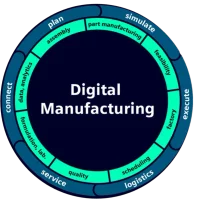
Tecnomatix is Siemens' digital manufacturing portfolio, built to answer those questions on a digital model first. It covers factory and line design, plant simulation, robotics and offline programming, human simulation and process and quality planning. Product, process, resource and plant data can be managed together in Teamcenter, so the manufacturing plan stays connected to the product design when it changes.
The portfolio is large, so the useful way to understand it is by the question each tool answers.
1. Plant Simulation: will the system deliver?
Plant Simulation is a discrete-event simulation tool for material flow, throughput, resource use and logistics, at every level of planning, from global facilities and local plants down to specific production lines. You build a hierarchical, object-oriented model of facilities, lines and operations, placing objects within objects and models within models, and a change to a library object is applied automatically wherever it is used. Models can be shown in 3D using built-in libraries or CAD data through JT.
The analysis tools are what make it useful for decisions: automatic bottleneck detection, throughput analysis, utilisation of machines, resources and buffers, energy consumption, cost analysis, Sankey diagrams and Gantt charts. Experiment management tools and integrated neural networks handle large sets of scenarios, and genetic algorithms can optimise the system settings automatically.
Plant Simulation is open to other systems through interfaces such as OPC UA, MQTT, ODBC, JSON, XML and sockets, and it connects to Siemens tools including Teamcenter, Simcenter HEEDS, Opcenter APS, TIA Portal, PLCSIM Advanced and SIMIT.
Typical questions: how many fixtures or AGVs do we need, where is the bottleneck, how big must the buffer be, what happens to output if a machine's availability drops, and what does a new product variant do to the shift plan?
2. Process Simulate: will each station work?
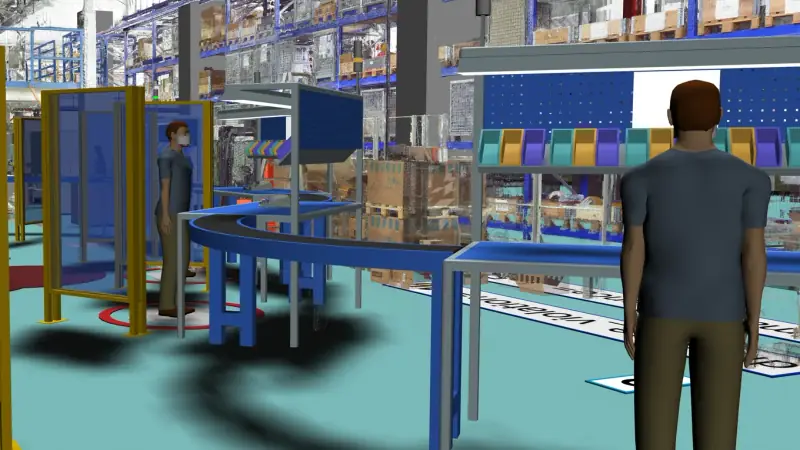
Where Plant Simulation looks at the flow through the whole system, Process Simulate looks at the detailed manufacturing process in 3D, from a single workstation up to a complete production line. It covers:
- Assembly: assembly and disassembly paths, collision and clearance checks, and the choice of tool for each operation.
- Robotics: collision-free path planning, robot placement and reach tests, cycle time and energy optimisation, and synchronising several robots across workstations and zones.
- Offline programming: creating and editing robot programs off the line, with program download and upload for all major robot brands, so production does not stop while programs are prepared.
- Virtual commissioning: running real PLC code against the digital model, using Siemens TIA Portal with PLCSIM Advanced or OPC UA, together with the actual robot programs.
- Continuous processes: weld seams and continuous paths for gluing, sealing and spraying, including paint and spray coverage and thickness.
- Human simulation: virtual operators scaled to the workforce, to check reach, cycle time and ergonomics against industry and company standards.
3. Designing the layout and the plan
Line Designer X is used to author, view and plan detailed manufacturing layouts in Designcenter NX, integrated with Teamcenter, using a rich library of configurable, parametric resources. On the planning side, Siemens' Manufacturing Process Management solution in Teamcenter manages product, process, resource and plant layout data in one PLM environment, and Teamcenter Easy Plan creates and manages the manufacturing bill of materials (MBOM) and the bill of process (BOP); when a design changes, the effect on the manufacturing plan can be analysed and reconciled. Quality tools bring dimensional analysis and inspection strategies into the same PLM environment.
4. A quick guide: question to tool
- "Will the line meet its rate, and where is the bottleneck?" → Plant Simulation
- "How many operators, carriers or AGVs do we need?" → Plant Simulation
- "Can the robot reach every point, without collisions, within the cycle time?" → Process Simulate robotics
- "Can we program the robots without stopping production?" → Process Simulate offline programming
- "Will the PLC and robot logic work before we go to site?" → Process Simulate virtual commissioning
- "Is this task safe and comfortable for the operator?" → Process Simulate human simulation
- "Where does each machine go, and does the layout fit the building?" → Line Designer X
5. Starting with a first study
Avoid trying to model the whole factory at once. A first study works better when it is tied to one decision with a deadline, such as approving a line layout or sizing a buffer. Before modelling, collect the input data the question needs: cycle times, availability and repair times, shift patterns, batch sizes and product mix. Validate the model against a line you already run, if you have one, before trusting it on a new one.
Siemens offers both main tools as tiered X packages. Plant Simulation X Essentials handles models of up to 500 objects, Plant Simulation X Standard up to 4,000, and Plant Simulation X Advanced has no object limit; there is also a Runtime product for running and experimenting with existing models, and a value stream mapping (VSM) library add-on. Process Simulate X comes in Essentials, Standard and Advanced tiers: Standard provides a complete virtual commissioning environment with real PLC logic, offline programming and event-based simulation, and Advanced provides a comprehensive robotic toolset for spot welding and continuous manufacturing processes. Starting small and adding capability as the questions grow is a sensible way to adopt it.
For a closer look at material flow modelling, read What is Plant Simulation. The Tecnomatix page summarises the portfolio and links the overview brochure.
Author

NomuTech
Siemens Digital Industries Software Partner