- Simcenter HEEDS
- Design space exploration
- MDAO
- Optimization
- SHERPA
- HEEDS POST
Stop checking one design at a time
Siemens' own HEEDS material makes a simple observation: companies tend to spend most of their virtual prototyping effort building and testing simulation models to validate designs, and comparatively little time exploring how to improve design performance. In other words, most of the effort goes into confirming that one design works, and little into asking which design would work best.
Simcenter HEEDS is built to change that ratio. It is a multidisciplinary design analysis and optimisation (MDAO) solution included in the Simcenter portfolio. Instead of starting from one design and using simulation to grade it, you state the performance you want, and HEEDS drives your existing CAD and CAE tools through many variants to find the designs that meet it.
This article explains what design space exploration means, the four building blocks HEEDS uses, and how to set up a first study that produces results you can trust.
1. What "design space exploration" actually means
Every study has three ingredients:
- Design variables: what you are allowed to change, such as wall thickness, fin count, a fillet radius, a material choice or the position of a fan.
- Responses: what you measure, such as pressure drop, peak stress, temperature, mass or cost.
- Objectives and constraints: what "better" means (minimise mass, maximise flow) and the limits that must hold (stress below the allowable, temperature below the rating).
Siemens contrasts this with traditional optimisation, which limits the search to local areas, typically around the starting design, and often requires the simulation model to be simplified so the search stays affordable. Design space exploration searches more broadly across the allowed range, can work with the full simulation model and aims to find several good solutions, or families of designs, rather than one point. That matters when the best answer is far from where you started, or when two objectives pull against each other and you need to see the trade-off before choosing.
2. The four building blocks
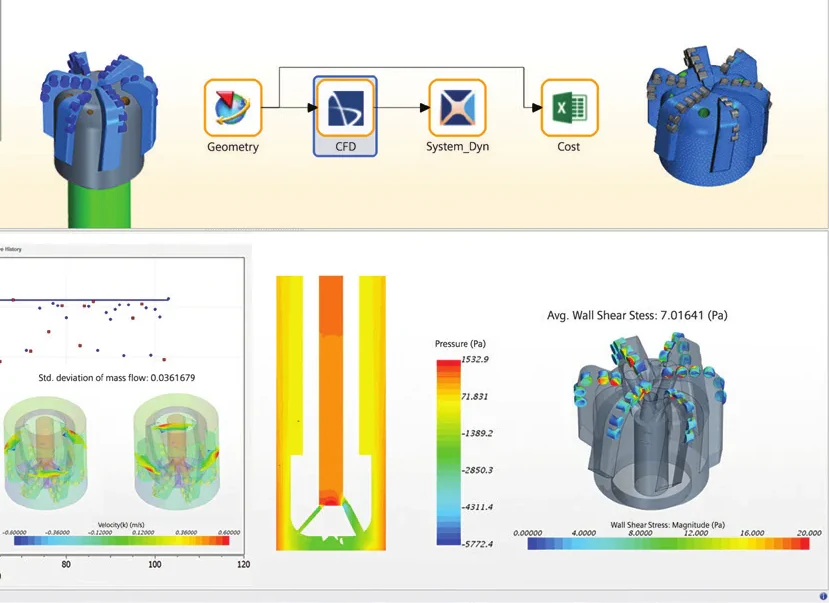
Process automation. HEEDS connects to your tools through ready-made interfaces, which Siemens calls portals, so native geometry can be modified, the simulation model re-meshed or updated and the model rebuilt for each variant without custom scripting or manual manipulation. A single workflow can chain 1D, 2D and 3D simulation with cost-estimating tools, in sequence or as co-simulation. The portals documented in the Simcenter HEEDS 2504 release notes include Designcenter NX, Simcenter 3D, Simcenter Amesim, FLOEFD and Excel, and the 2504 release added portals for Ansys Discovery and Aspen Simulation Workbook. Siemens' own HEEDS page also shows HEEDS used together with Simcenter STAR-CCM+.
Distributed execution. HEEDS orchestrates simulation tasks across platforms and operating systems. Siemens' own example: geometry changes run on a Windows laptop, a structural run on a Linux server and a CFD run on several cores of a Linux cluster, with HEEDS collecting the results in one study. Local, remote, cluster and cloud computing resources can all be used.
Efficient search. The search engine is called SHERPA. It uses several global and local search strategies at the same time and adapts the search as it learns more about the design space. It requires no model simplification, model fitting or surrogates, and it requires no algorithm expertise from the user. You can give it a time budget and it adapts its strategy to that budget.
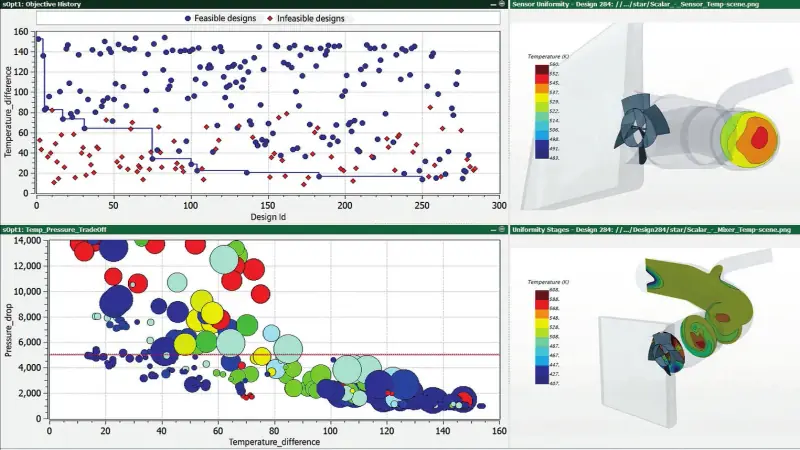
Insight and discovery. Results are reviewed in HEEDS POST, the post-processing and data-mining tool of HEEDS. It can combine history plots, parallel plots, design tables and images of the designs on one screen, and it reveals correlations and sensitivities, so you can see which variables drive each response. HEEDS also allows the robustness of a design to manufacturing tolerances to be assessed. Reports can be exported as interactive HTML, so reviewers do not need a licence to read them.
3. What a study looks like in practice
The HEEDS brochure describes a study on a computer enclosure. Starting from a standard CAE model, HEEDS varied the positions of the fan and vents and the size, shape, density and material of the heat sinks. It evaluated 200 configurations in two days on 50 cores and found a design that improved cooling by 10 percent while cutting heat sink mass by 50 percent compared with the baseline.
Two things in that example are worth copying. First, the variables mixed layout choices with part geometry and material, which is exactly the kind of combination that is hard to explore by hand. Second, the result was better on two objectives at once, cooling and mass. Results like that are easy to miss when you change one parameter at a time, and they are what a broad search across many variables is meant to uncover.
4. Setting up your first study
A first study succeeds or fails on preparation. A practical sequence:
- Start from a model that already runs reliably. If a single run needs manual fixes, an automated study will stall on the first failed variant.
- Choose a small number of variables that matter. Use engineering judgement for the first pass; the sensitivity results will tell you later which ones to drop or add.
- Make every response extractable without a person. Peak stress, mass, pressure drop: each must come out of the run automatically.
- Test one variant end to end inside HEEDS before launching the search. The aim is that a single button evaluates any variant.
- Set the evaluation budget from real numbers: run time per variant, cores available and the deadline.
- Review in HEEDS POST, then confirm. Re-run the chosen designs and check them against your normal acceptance criteria before they go to detailed design.
5. Where AI fits
Siemens has added AI to the search rather than replacing it. The HEEDS AI Simulation Predictor works alongside SHERPA and learns as the study runs. Siemens states it can save up to 40 percent of computational time on lengthy optimisations and can reuse data from earlier studies. Release 2504 gathered surrogate modelling in HEEDS POST into a dedicated Surrogates tab, and, according to Siemens' "What's new in Simcenter HEEDS 2604" summary, release 2604 enhances GPU-accelerated neural network training and deployment and adds Pareto convergence monitoring tools. Treat these as accelerators for expensive simulations; the study set-up above stays the same.
6. Who gets the most from it
HEEDS pays off where each run is expensive, where several disciplines interact (structure, flow, heat, cost), or where a product family is redesigned often. Siemens' message is that design space exploration should not be limited to optimisation specialists, and the set-up above is within reach of any engineer who already runs reliable simulations.
The HEEDS product page links the Siemens HEEDS and HEEDS POST fact sheets.
Author

NomuTech
Siemens Digital Industries Software Partner