
Teamcenter Lifecycle Visualization: Illustrate
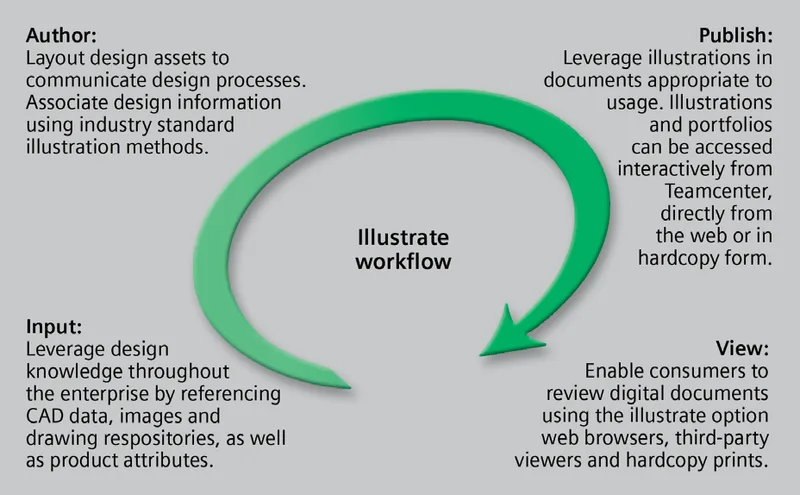
Creating technical illustrations from product data with Teamcenter Lifecycle Visualization.
This two-page datasheet describes the illustrate add-on option for Teamcenter lifecycle visualization. It is an older document, published in 2011 under the Siemens PLM Software name, so it reflects the product as offered at that time. It explains how technical illustrations for work instructions, maintenance manuals and parts catalogues can be built directly from JT design data, so documentation can start before the design is final and stay linked to it.
What the document covers
- Capturing 3D geometry snapshots, annotations and markups to the clipboard while keeping a link to the original JT file
- A Microsoft Visio based authoring environment with drag-and-drop 3D content, rulers, grids, stencils and reusable templates (the Visio licence is not included)
- Illustrations that combine text, 2D and 3D graphics, annotations and tables, grouped into portfolios with consistent headers, footers and tables of contents
- Callouts, a symbol manager for custom icon libraries and a thrustline editor for assembly instructions
- Change detection through Teamcenter, so updated design assets flow into illustrations through the normal change review process
- Delivery of managed illustrations in lightweight web format, and export to Visio, HTML and other formats
Who it is for
Technical publications teams, illustrators and documentation managers who produce assembly, service and parts documentation from managed CAD data, particularly those already using Teamcenter lifecycle visualization.
Related product
 TeamcenterProduct lifecycle management for CAD data, bills of materials, documents and change control.See the product
More in the Knowledge Center




Have a project in mind?
Tell us what you are building and a NomuTech engineer will get in touch.